Web Development
Solved: Failed to Download laravel/laravel from dist in XAMPP (macOS Fix)
Saranath Ishara Udayanga
Published on December 17, 2025
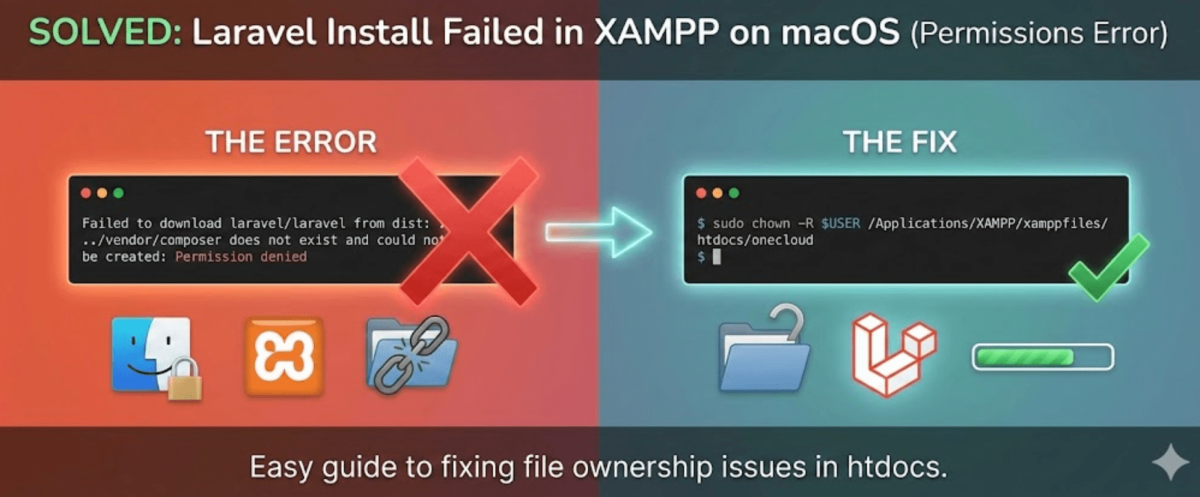
This error usually happens on macOS because the htdocs folder inside XAMPP is owned by the system ("root"), so your standard user account doesn't have permission to create new folders inside it.
Here is how to fix the permissions and install Laravel successfully.
Step 1: Fix Permissions on the Folder
You need to take ownership of your project folder so Composer can write to it. Run this command in your terminal:
sudo chown -R $USER /Applications/XAMPP/xamppfiles/htdocs/(Project-Folder) in Example - onecloud
(You will need to type your Mac login password. It won't show on screen while you type; just type it and hit Enter.)
Step 2: Clean Up the Failed Install
Since the previous attempt failed halfway, you likely have some corrupted files. Run these commands inside your project ( in Example: onecloud ) folder to clean it:
rm -rf vendorrm composer.lock
Step 3: Retry the Installation
Now that you own the folder and it is clean, run the creation command again:
composer create-project laravel/laravel .
Why did this happen?
By default, XAMPP protects the htdocs directory. When you ran the command, Composer tried to create the vendor folder but was blocked by macOS security. The chown (Change Owner) command tells macOS, "I own this specific folder now, let me write files here."